Download udiMagic – Excel to Tally Software
udiMagic supports the latest release of Tally Prime. To import data into Tally Prime 3.0 or higher, use udiMagic v12.
Windows 10 / 11 | Free to try
Looking for the best tool to import data from Excel to Tally? udiMagic is a powerful Excel to Tally software that helps you quickly upload vouchers, masters, and GST data into Tally Prime with speed and accuracy. Whether you are an accountant, business owner, or CA firm, udiMagic simplifies bulk data import from Excel to Tally without manual entry.
With ready-to-use templates, automatic master creation, and support for large datasets, udiMagic is designed to save hours of effort and eliminate errors in Tally data entry.
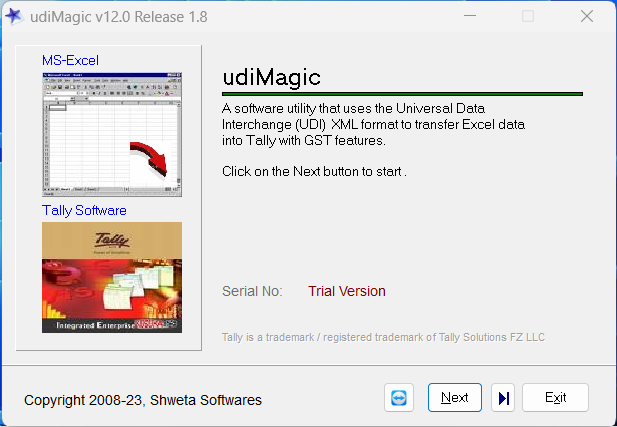
How to Import Excel Data into Tally Prime
- Start Tally Prime and Open a Company.
- Start udiMagic software
- Select the option Excel to Tally
- Select the option Import data into Tally
- Click the Browse button and select any Standard Excel template provided with udiMagic converter
- Click the Start button
A simple yet powerful tool to import data in Tally Software. Try udiMagic DEMO utility for free and see it for yourself. Import all vouchers, masters in Tally Prime using simple excel formats.
See Video: udiMagic Software – It's faster than ever.
Software Specifications
- Name:udiMagic Excel to Tally Software
- Category:Business Application
- Sub-Category:Utility for Tally Prime
- Version:Version 12
- File Name:udiMagicSetup.exe
- Operating System:Windows 10 · Windows 11 · Windows Server 2016+
- Publisher:Shweta Softwares
- Copyright year:2008
- Screen Snapshot:udiMagic Software
Licensing and Pricing
- Licensing:Free to try
- Trial period:14 days
- Trial limitations:5 records
- Product Id:udiMagic Standard (12 months subscription)
- Currency:INR
- Price (Excl. GST):10800
To use the software after the trial period, you must buy a licensed copy by paying the requisite charges. Refer the buy page for prices of other udiMagic variants.
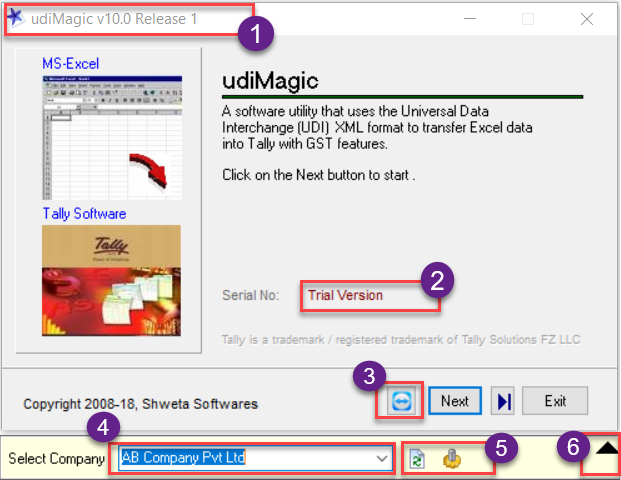
udiMagic Home-screen Information
- Displays udiMagic Version and Release.
- Displays udiMagic Serial Number or Trial version.
- Remote Support button. PS: Teamviewer is provided with udiMagic Software.
- Displays the Company in Tally Prime in which the data will be imported.
- Refresh button and Settings button.
- Toggle button to hide/show the Company Name drop-down list.
Key Features of udiMagic Excel to Tally Software
Everything you need to automate Excel to Tally data entry.
Import data in Multiple Tally Companies
Import data from a single Excel file into multiple Tally companies seamlessly. Works with Tally Prime, ensuring smooth data integration without compatibility issues.
Automatic Ledger and Stock Creation
No need to pre-create masters in Tally. udiMagic automatically creates ledgers, stock items and other masters during import.
GST-Ready Excel Templates
Use ready-to-use Excel templates designed for GST compliance, ensuring accurate tax calculation and reporting in Tally.
Fast and Accurate Data Import
Avoid manual errors and reduce data entry time with validated and structured Excel uploads into Tally Prime.
Batch Processing and Automation
Import multiple files and large datasets efficiently with batch processing capabilities, ideal for businesses handling high volumes of data.
Import Vouchers and Masters in Bulk
Upload thousands of transactions including sales, purchase, receipt, payment, and journal vouchers directly from Excel to Tally in minutes.
Who Should Use udiMagic Software?
udiMagic is built for finance and accounting professionals.
Chartered Accountants and Tax Professionals
Manage client data efficiently by importing bulk transactions into Tally without manual effort.
Businesses with High Transaction Volume
Ideal for companies handling large volumes of sales, purchase, and inventory data in Excel.
FMCG, Pharma, Automobile Distributors and Dealers
Import DMS data from Excel into Tally for accounting and GST compliance.
Accountants and Bookkeepers
Save time and reduce errors by automating Excel to Tally data entry processes.
Why Choose udiMagic for Excel to Tally?
Trusted by accountants and businesses across India since 2008.
- Easy-to-use interface
- Variety of Excel templates
- High-speed bulk import capability
- Accurate GST data handling
- Trusted by accountants and businesses since 2008
Frequently Asked Questions
Quick answers about udiMagic Excel to Tally software. For more, visit our full FAQ page.