Data Grouping in udiMagic — Group & Summarize Excel Rows Before Import in Tally
Published · Updated
udiMagic now supports data grouping feature. With this, you can import summarized data from Excel into Tally Prime. Let's see how it works.
SOURCE : Excel sheet with Sales data

- In the above Excel sheet, there are 5 rows of data.
- In this, the Item1 appears three times
- And Item2 appears twice
DESTINATION : Sales data imported in Tally using udiMagic
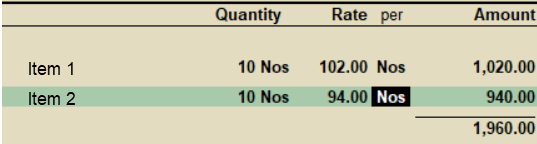
- On importing data from Excel to Tally, only two items are imported
- The Item1 appears once only. (Qty: 3+2+5 Nos = 10 Nos)
- The Item2 appears once only. (Qty: 6+4 Nos = 10 Nos)
Remarks:
- The excel data is automatically grouped on Stockitem and imported into Tally.
- The template 'Vouchers-Sales-Purchase-with-StockItems-Advanced.xls' now supports the data-grouping feature.
- A new field / column GroupByStockItem has been added in the said template.
- For your reference, one entry with 'GroupBy' feature has been included in the said template.
Ready to import your Excel data into Tally?
Download udiMagic and start a 14-day free trial — no credit card required.
Download udiMagic View Pricing